In the evolving era of remote-first teams, hybrid work models, and globally distributed IT infrastructures, virtual desktops are no longer a “nice-to-have” — they’re becoming a strategic foundation for enterprise computing. Across industries, organizations are transforming how they manage, deploy, and secure employee workspaces, especially in Mac environments driven by high-performance creative and technical workloads.
For CIOs and IT leaders, the implications are clear: understanding these future trends in macOS desktop virtualization today can position your organization for competitive advantage tomorrow.
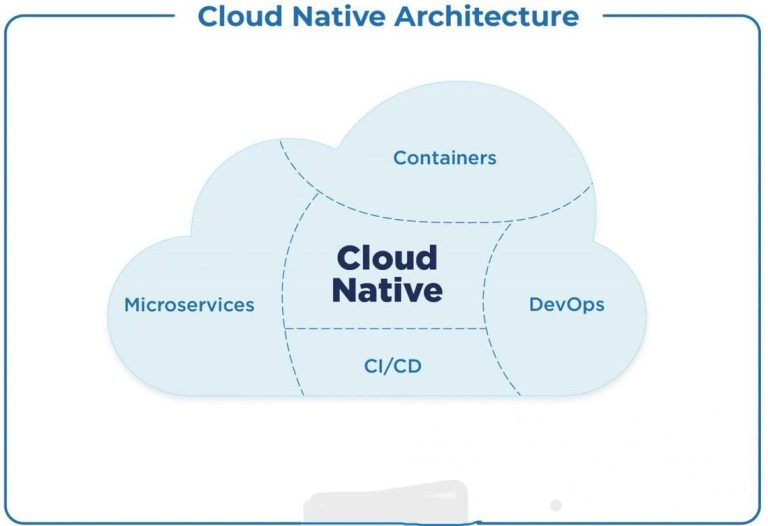
1. Cloud-Native and Multi-Cloud Desktop Architectures
Most enterprises are shifting beyond traditional endpoint management toward cloud-native VDI strategies. Rather than hosting desktops in a single datacenter, leading organizations are adopting multi-cloud and distributed models that improve accessibility, resiliency, and geographic performance.
Key movements include:
Containerization and orchestration of system workloads for rapid provisioning.
Use of micro-VM and light virtualization layers to scale on demand.
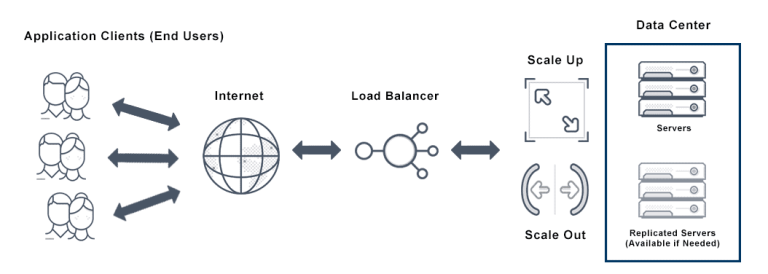
Distributed failover and redundancy across regions to ensure uninterrupted user sessions.
These approaches allow IT teams to reduce latency, support global teams, and optimize capacity without costly physical hardware deployments.
Why this matters: Workforces expect near-native desktop performance, whether in New York, Tokyo, or Berlin — and cloud-native models make that possible without bloated infrastructure costs.
2. Remote Display and Graphics Performance Breakthroughs
A persistent challenge for virtual desktop technology has been rendering high-resolution graphics over remote connections. Emerging display protocols are addressing this head-on, with improved support for:
4K and higher resolutions.
Multi-monitor workflows.
Enhanced color and refresh rate fidelity.
For creative teams using design, video editing, and 3D modeling tools — tasks once thought impractical over virtual desktops — these improvements are game-changing.
This trend isn’t just about prettier screens; it’s about true functional parity between a virtual workspace and a local machine, even for graphics-intensive use cases.
3. AI-Driven Predictive Autoscaling and Automation
Artificial intelligence (AI) and machine learning are rapidly becoming embedded in virtual desktop infrastructure (VDI) management. Rather than static pools of resources, advanced AI systems can:
Predict resource spikes — such as GPU needs during video rendering.
Autoscale computing power up or down without manual intervention.
Identify bottlenecks before users are impacted.
Automate lifecycle management of desktops and patches.
This means reduced overhead for IT teams and a more responsive, reliable end-user experience. In other words, virtual desktops are evolving from simple remote access tools to self-optimizing, intelligent workplace platforms.
4. Specialized Desktop-as-a-Service Solutions
Not all virtual desktops are created equal. Increasingly, providers and enterprises are building industry-optimized offerings tailored for specific workloads — whether that’s:
Swift/Xcode build farms for software development teams.
GPU-accelerated environments for video, 3D rendering, and design.
Customized virtual workspaces for legal, engineering, and data science teams.
These tailored systems go beyond generic virtual desktops by pre-configuring performance profiles, software stacks, and access controls that align with specific departmental needs. The result? Faster onboarding, higher productivity, and deeper team satisfaction.
5. Security & Zero-Trust Integration
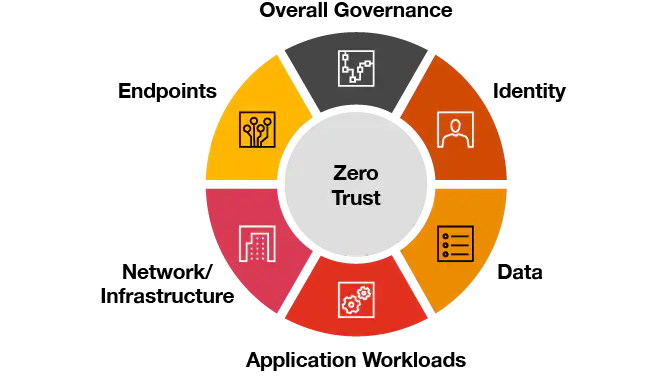
Security remains a core concern as remote access becomes the norm. The future of virtual desktops is tightly coupled with advanced zero-trust and continuous authentication strategies, including:
Contextual access policies based on user identity and device posture.
AI-driven threat monitoring within VDI sessions.
Granular controls for session isolation and data protection.
By implementing zero-trust models, organizations ensure that every access request — inside or outside the network — is verified before granting workspace access. This is especially crucial in regulated industries and for teams handling sensitive data.
The Strategic Importance of Staying Ahead
Looking around modern enterprise technology landscapes, it’s clear that virtual desktops are not a passing trend — they’re becoming a core enabler of business agility and productivity. Messages from technology leaders and surveys show a definitive shift toward remote and hybrid environments, where Macs are increasingly central to IT strategy.
Ignoring these shifts could mean slower provisioning cycles, higher total cost of ownership (TCO), and unmet expectations from distributed teams. Leaders who embrace these trends can unlock:
Faster deployment cycles.
Greater scalability with predictable costs.
Seamless remote collaboration.
Stronger security posture.
What’s Next for CIOs and Enterprise IT
The future of Mac virtual desktops hinges on scalability, performance, automation, security, and specialization. IT leaders should be thinking about:
How multi-cloud and containerized architectures can support global teams.
Ways to leverage AI for smarter infrastructure management.
Deploying zero-trust practices at every access layer.
Aligning virtual desktop innovation with organizational goals.
What was once a niche remote access tool has become a cornerstone of modern work — one that enables anywhere, anytime productivity at scale.